
Attribute Injector
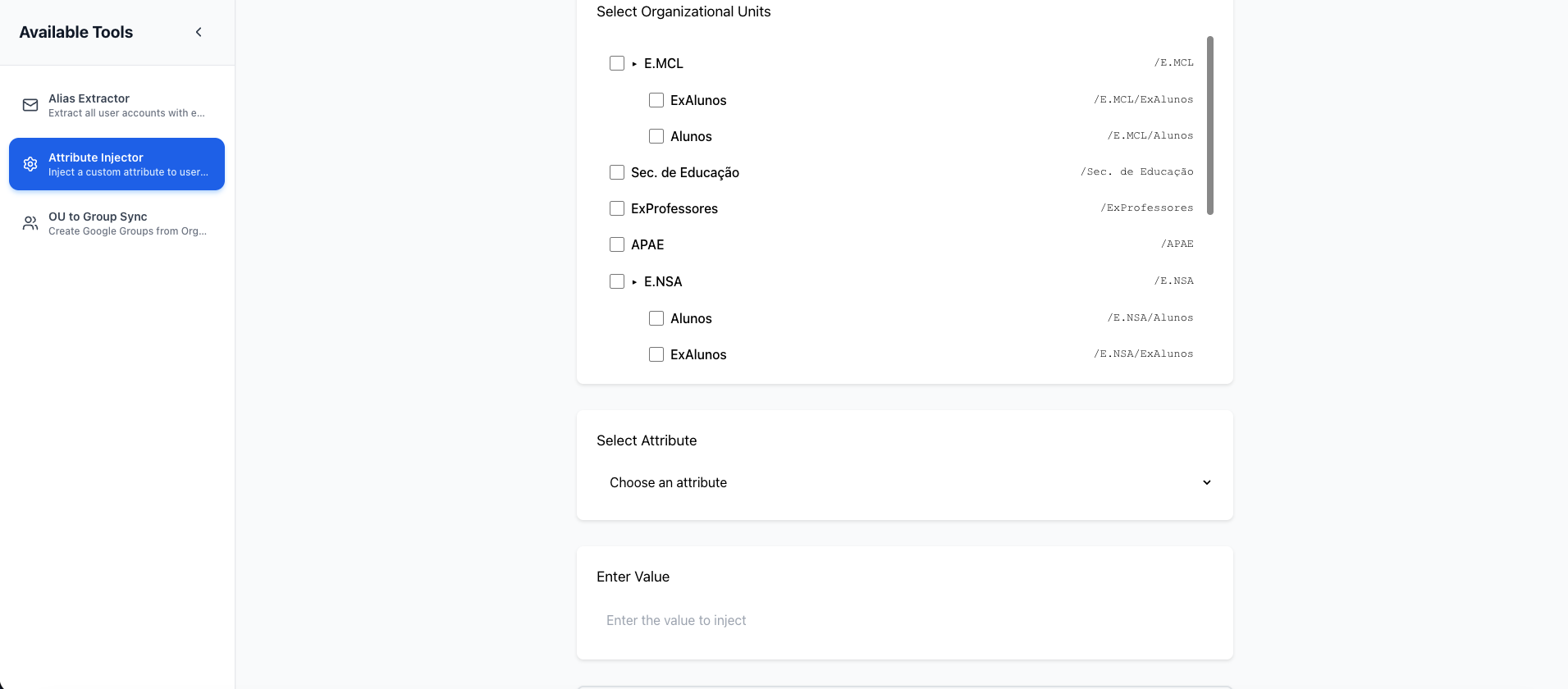
The Attribute Injector allows you to batch inject custom attributes to all users within a specified Organizational Unit, saving hours of manual work.
Overview
Google Workspace supports custom user attributes through custom schemas. The Attribute Injector makes it easy to apply these attributes to all users in an OU at once, rather than manually updating each user individually.
How It Works
- Select Target OU: Enter the organizational unit path (e.g.,
/Students/Grade-12) - Specify Attribute: Enter the custom attribute name from your schema
- Set Value: Enter the value to assign to all users (e.g., "student", "staff", "teacher")
- Inject: Click "Inject Attributes" to apply changes
- Review Results: See how many users were updated successfully
Prerequisites
Custom Schema Required
Before using the Attribute Injector, you must create a custom schema in Google Workspace:
- Go to Google Admin Console
- Navigate to Directory > Users > Manage custom attributes
- Click Add Custom Attribute
- Create your schema (e.g., "SchoolInfo")
- Add fields (e.g., "role", "gradeLevel", "building", "studentID")
Usage Example
Scenario: Assign Role to Students
You want to assign the role "student" to all users in the Grade 12 OU.
Steps:
- Organizational Unit:
/Students/Grade-12 - Attribute Name:
SchoolInfo.role - Attribute Value:
student - Click Inject Attributes
Result: All users in /Students/Grade-12 now have role = "student"
Attribute Name Format
Attributes are specified in the format: SchemaName.FieldName
Simple Examples:
SchoolInfo.rolewith values like:student,teacher,staff,adminSchoolInfo.gradeLevelwith values like:K,1,2,12,GraduateSchoolInfo.buildingwith values like:Main,North,South
Important: You can use simple, plain text values like "student" or "teacher" - no complex codes needed!
Common Use Cases for Schools
Assign User Roles
Identify users by their role in the school.
OU: /Faculty/Science
Attribute: SchoolInfo.role
Value: teacher
Set Grade Levels
Tag students by their current grade level.
OU: /Students/Grade-9
Attribute: SchoolInfo.gradeLevel
Value: 9
Building Assignment
Track which building or campus users belong to.
OU: /Students/Elementary
Attribute: SchoolInfo.building
Value: Elementary Campus
Department Classification
Assign faculty to academic departments.
OU: /Faculty/Mathematics
Attribute: SchoolInfo.department
Value: Math
Student Type
Differentiate between different student categories.
OU: /Students/Special-Programs
Attribute: SchoolInfo.studentType
Value: Gifted and Talented
Permissions Required
The Attribute Injector requires:
https://www.googleapis.com/auth/admin.directory.user
This permission allows:
- Reading users in the specified OU
- Updating user custom attributes
- Note: This is a write permission
Best Practices
Test on Small OUs First
Before applying attributes to large OUs:
- Test on a small test OU with 2-3 users
- Verify the attribute appears correctly in Admin Console
- Then proceed with larger OUs
Use Hierarchical OUs
Organize your OU structure to match your attribute needs:
/
├── Sales/
│   ├── North America/
│   ├── Europe/
│   └── Asia/
├── Engineering/
│   ├── Backend/
│   ├── Frontend/
│   └── DevOps/
Document Your Schema
Maintain documentation of:
- Custom schema names and fields
- Meaning of each attribute
- Valid values for each field
- Which OUs use which attributes
Naming Conventions
Use consistent naming for attributes:
- PascalCase for schemas:
EmployeeInfo,ProjectData - camelCase for fields:
costCenter,employeeType - Descriptive names: Avoid abbreviations
Backup Consideration
The Attribute Injector adds attributes, it doesn't remove existing values. However:
- Keep records of what attributes you've assigned
- Test changes on non-production OUs when possible
- Document your attribute assignments
Limitations
OU Scope Only
The tool operates on Organizational Units. You cannot:
- Target individual users
- Use Google Groups as targets
- Apply to users outside the specified OU
Workaround: Move users to a temporary OU, apply attributes, then move back.
One Attribute at a Time
Each operation sets one attribute on all users. To set multiple attributes:
- Run the injector multiple times
- Use different attribute names each time
Existing Values Overwritten
If users already have a value for the specified attribute, it will be overwritten with the new value.
Custom Schema Required
You cannot inject attributes that don't exist in a custom schema. Standard Google Workspace fields cannot be modified through this tool.
Performance
- Small OUs (< 50 users): 5-15 seconds
- Medium OUs (50-500 users): 15-60 seconds
- Large OUs (500+ users): 1-5 minutes
Processing time depends on:
- Number of users in OU
- Google API response times
- Network latency
Troubleshooting
"Attribute not found" Error
The specified attribute doesn't exist in your custom schema.
Solution:
- Go to Admin Console > Directory > Users > Manage custom attributes
- Verify the schema and field exist
- Use exact format:
SchemaName.fieldName
"OU not found" Error
The organizational unit path is incorrect.
Solution:
- Check OU path format starts with
/ - Verify OU exists in Admin Console
- Use exact path (case-sensitive)
Permission Denied
Your authenticated user lacks permission to modify users.
Solution:
- Authenticate as a super administrator
- Or grant user admin role with user management permissions
No Users Updated
The OU might be empty or contain no users.
Solution:
- Verify users exist in the OU (check Admin Console)
- Ensure you're using the correct OU path
- Check that users aren't in sub-OUs (tool doesn't recurse by default)
API Rate Limits
Google Workspace has rate limits for user updates:
- The tool automatically handles rate limiting
- Large OUs may take longer due to throttling
- Failed updates are retried automatically
Security Considerations
Audit Logging
All attribute changes are logged in Google Workspace audit logs:
- View logs in Admin Console > Reporting > Audit
- Track who made changes and when
- Review attribute modifications
Access Control
- Only grant Attribute Injector access to trusted administrators
- The tool has write permissions to user data
- Consider using a dedicated service account with limited scope
Data Validation
The tool doesn't validate attribute values. Ensure:
- Values are appropriate for the field
- Sensitive data isn't included
- Values follow your organization's conventions
Technical Details
Implementation
- Uses Google Admin SDK Directory API
- Batch processing for efficiency
- Automatic retry on transient failures
- Real-time progress updates
API Calls
For an OU with N users:
- 1 API call to list users in OU
- N API calls to update user attributes
- Total: N+1 API calls
Next Steps
- Learn about OU Group Sync
- Review Alias Extractor
- Check the FAQ for common questions